vtmate
🇬🇧

Configuration

Configure Agents

Add, edit or remove agents either from inside vtmate with the Control+S popup, or by editing the settings files directly - plus every [agent] field and every LLM provider vtmate supports.

The Control+S panel

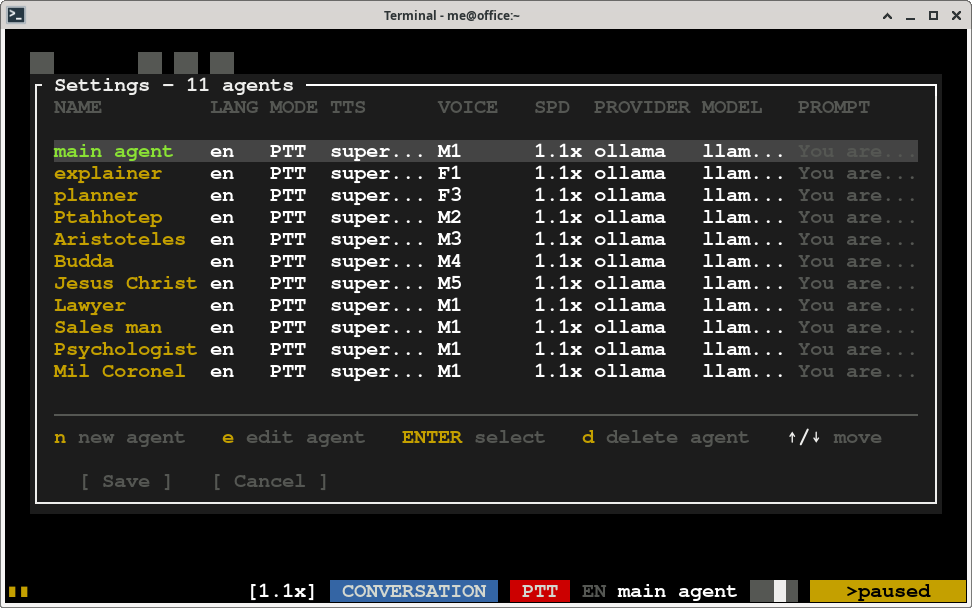
The quickest way to configure agents is to press Control+S while vtmate is running. A popup opens with the list of your agents - add, edit or remove one without leaving the conversation. Everything you change is written back to the agents file the moment you save.

Control+S agents popup listing every agent

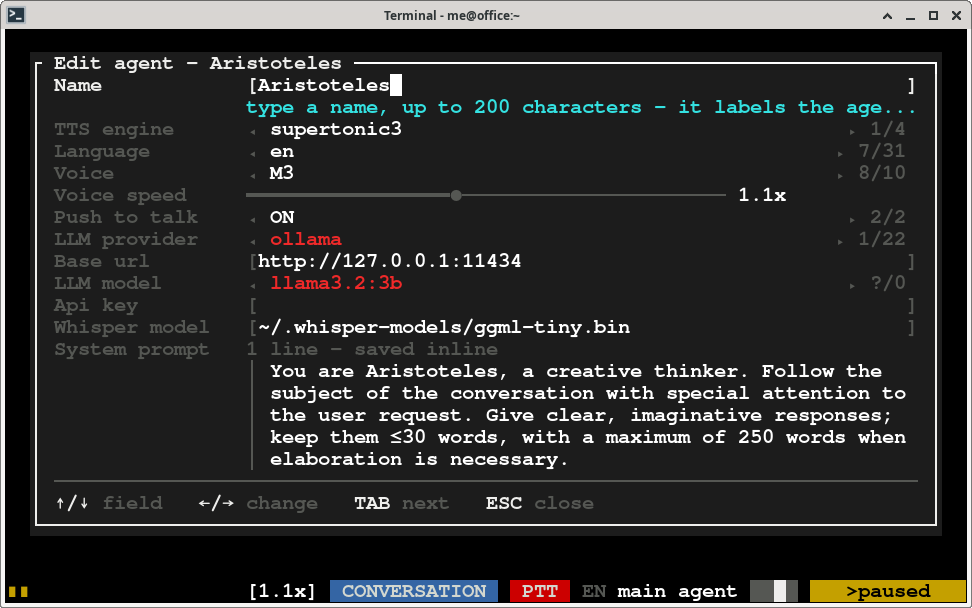
Press e (or select an agent and hit ENTER) to edit it - every field is editable right there, including the system prompt:

Editing a single agent's fields in the Control+S popup

A system prompt of more than 5 lines is automatically saved as a reusable [system_prompt] block instead of an inline string (see below) - and if the prompt you are editing already came from one, it is written back under that same name so every agent sharing it keeps sharing it.

The settings files, directly

Everything the panel writes lives in two plain text files under ~/.vtmate ("~" is your home directory), which you can also edit by hand:

FileSections
~/.vtmate/settings[general] (the agent vtmate starts with) and [daemon] (background mode's global shortcuts - see Background Shortcuts)
~/.vtmate/agentsone [system_prompt] section per named prompt, then one [agent] section per agent

-c <file> points vtmate at a different agents file instead of ~/.vtmate/agents - handy for keeping separate agent groups for different debates or tasks. ~/.vtmate/settings is always the same single file, regardless of -c.

Load an alternate agents file

vtmate -c philosophers.txt

Reusable system prompts

A long system prompt is easier to write once and share between agents as a named [system_prompt] block in ~/.vtmate/agents. It holds a name and then the prompt body fenced between two lines of three or more dashes; agents pull it in with system_prompt = @<name>:

[system_prompt]
name = planner
---
You assist the user in the creation of a plan based on the user's goal.

When defining the plan follow these format standards:
  1. The plan is composed by tasks and subtasks.
  2. Each task has the format: "[ ] <task name>".
  3. Subtasks are indented with 2 spaces below the parent task.
---

[agent]
name = planner
...
system_prompt = @planner

The body is taken exactly as written - blank lines, indentation, quotes and lines starting with [ are all kept, and no \n escape is expanded since it already has real newlines. Close a body that itself contains a --- line with a longer fence (----). An inline prompt keeps working exactly as before - system_prompt = "You are a nice ai agent\nreply nicely" turns \n into a real newline; start one with @@ if it needs to begin with a literal @.

Agent fields

FieldMeaning
nameA short name for the agent.
languageAny of the supported languages (see Home for the full table), used for both speech recognition and text-to-speech.
voiceThe voice name for this agent - run vtmate --list-voices to see every voice per language and TTS system. Voice mixing (Kokoro only): mix two voices by percentage, e.g. bm_daniel.5+am_puck.5 for 50/50.
voice_speedPlayback speed, from 0.6 to 1.8. Adjustable live with ARROW_UP / ARROW_DOWN.
ttsThe TTS engine: supertonic3 (default, 31 languages), supertonic2, kokoro, or opentts (needs docker run -p 5500:5500 synesthesiam/opentts:all).
providerWhich system answers the prompt - see the provider table below.
baseurlHost and port (no path) for local servers, e.g. http://127.0.0.1:11434 for ollama, or wherever an openai-compatible-api endpoint is, local or remote. Every hosted API and CLI provider ignores it - setting it there is rejected.
modelThe model name to use (some llama-server builds ignore this, since they serve a single model).
api_keyAPI key for hosted providers. Optional: leave empty to use the provider's own environment variable (OPENAI_API_KEY, ANTHROPIC_API_KEY, GOOGLE_API_KEY, GROQ_API_KEY, MISTRAL_API_KEY, OPENROUTER_API_KEY, DEEPSEEK_API_KEY, XAI_API_KEY).
system_promptThe system prompt sent with every request. Use \n for new lines inline, or @<name> to reuse a [system_prompt] block (see above).
pttPush-to-talk: when true, hold SPACE to record and release to send. When false, vtmate listens continuously (LIVE mode). See PTT / Live modes.
sound_threshold_peakA value between 0 and 1 used as the peak level that counts as speech, in LIVE mode.
end_silence_msMilliseconds of silence below sound_threshold_peak required before your speech is submitted, in LIVE mode. Ignored in PTT mode, where releasing SPACE submits immediately.
whisper_model_pathPath to the whisper model used for speech recognition. vtmate self-extracts ~/.whisper-models/ggml-tiny.bin (default) and a quantized ggml-small-q5_1.bin for better accuracy - point here to use the bigger one, or any other whisper model you download.

LLM providers

Set with the agent's provider field. Providers fall into three groups: local servers you run yourself, hosted cloud APIs, and CLI-based subscriptions that reuse a tool you are already logged into.

Kindprovider valueLocal / CloudbaseurlAPI key
Local serverollama (default; 0.13+)LocalRequired, e.g. http://127.0.0.1:11434Not needed
Local serverllama-serverLocalRequiredNot needed
Local/remote serveropenai-compatible-apiEither - any server exposing /v1/chat/completions (LM Studio, vLLM, Azure OpenAI, a proxy, LiteLLM, ...)Required, wherever it runsDepends on the endpoint
Hosted APIopenai-apiCloudIgnoredOPENAI_API_KEY
Hosted APIanthropic-apiCloudIgnoredANTHROPIC_API_KEY
Hosted APIgoogle-apiCloudIgnoredGOOGLE_API_KEY
Hosted APIgroq-apiCloudIgnoredGROQ_API_KEY
Hosted APImistral-apiCloudIgnoredMISTRAL_API_KEY
Hosted APIopenrouter-apiCloudIgnoredOPENROUTER_API_KEY
Hosted APIdeepseek-apiCloudIgnoredDEEPSEEK_API_KEY
Hosted APIxai-apiCloudIgnoredXAI_API_KEY
Subscription CLIclaude-cli, codex-cli, gemini-cli, copilot-cli, kiro-cli, vibe-cli, hermes-cli, opencode-cli, pi-cli, aichat-cli, grok-cliCloud (via your own logged-in CLI)IgnoredNot needed - whatever the CLI is already logged into. model is passed to the CLI directly.

Models run locally by default, but every local provider can also point at a remote host by setting its baseurl. Thinking/reasoning is disabled on local servers so replies start speaking right away.